
These days almost every wedding has its own website, and a baby shower is a similar event. It makes just as much sense to give yours a home online. Most showers still happen in person, and a virtual baby shower is simply how you include the people who can’t be there, like the friends and family who moved away or live too far to travel. With a platform like WebBabyShower, your invitations, registry, photos, messages, and video call all live in one place, so everyone can take part no matter where they are, whether they join on the day or follow along in the weeks around it. This guide covers the basics of planning a virtual baby shower, from setting up your shower page and picking a date to sending party boxes, setting up the registry, and planning activities that keep everyone involved.
Virtual Baby Shower: How Does It Work?
Most people picture a virtual baby shower as just a video call. The call is one part of it, but the bigger part is the baby shower website, where you organize the invitations, the registry, and all the shower details for your guests, both the ones in the room and the ones joining from far away. That is why we built WebBabyShower as one integrated solution instead of a video tool with everything else bolted on.
When it is time for the live call, a simple plan keeps things moving. Rather than having everyone join and figure it out as they go, map out a few activities, such as a welcome, games, gift opening, and a toast. Because the call is built into WebBabyShower, there is no separate app to download, and guests who can’t make it live can still leave messages, play games, and see photos on your shower page in the days before and after. That is what lets you include family and friends who have trouble traveling or who live far away.

Throw a Virtual Baby Shower so Everyone Can Celebrate!
• Explore the demo before choosing a plan
• Only 1 Minute Setup!
• 80+ Custom Themes & Matching Invites
• Use Any Online Registry
• Send Unlimited Invites and Updates
• Baby Shower Games with Scoreboards, Give Prizes!
Beyond the Video Call: Making Your Virtual Baby Shower Feel Like a Party
What a Virtual Shower Gets Right
A virtual shower can give everyone a chance to be part of the celebration without the noise and distractions that can come with a large gathering. Guests get a good view of the parents-to-be and can join in from the comfort of their own homes. It also means the hosts don’t have to spend as much time preparing a space or taking care of a large group of people.
Plan the Experience
Don’t just schedule the video call and hope everything goes smoothly. Think about how you want the shower to flow, from the welcome to the games and final toast. A few simple touches can also make the call feel more personal, such as using a shared virtual background, having everyone enjoy the same snack, or playing a pre-recorded video message from a family member.
Give Guests More to Do Than Send a Gift
A shower should feel like more than a request for presents. Give guests real ways to take part: share a piece of advice, write a message for the baby, play a game, or record a short hello. When people feel involved, they remember the shower as something they were part of. Your shower page makes this easy, since guests can leave messages and photos whenever they like, even if they can’t join the call.

Tips for Hosting a Successful Virtual Baby Shower
A little preparation and some virtual baby shower etiquette make the shower much easier to manage. Have one person act as a tech co-host to manage the meeting, handle the waiting room, and help guests with connection problems. This allows the parents-to-be to focus on enjoying the celebration. It’s also helpful to send simple instructions to family members who aren’t very comfortable with video calls. Most importantly, keep things moving so guests stay interested and involved.
If your guest list is large or brings together very different groups, like work friends and far-flung family, you don’t have to squeeze everyone onto one call. Some hosts run two shorter showers instead, which gives each group more time to actually talk with the parents-to-be. Having more than one shower is common anyway: our own data shows that 72% of moms have more than one, so a second shower is nothing unusual.

Step 1: Choosing a Platform for Your Shower
Start With a Platform Built for Baby Showers
A general video app can host a call, but a baby shower needs more than a call, and it is worth seeing which are the best virtual baby shower platforms. WebBabyShower is built for this one event, so instead of piecing things together across different apps, you get a dedicated shower website with everything in one place: your invitations, your registry, games, photos, guest messages, and video calls built right in.
Because the video call is included, there is no separate app for guests to download or sign into. Your page also gives everyone a place to connect before, during, and after the shower, so family and friends who can’t join the live call can still leave messages, share photos, and play games in the days around it. You can match the whole shower to one of 100+ themes, so your invitations, website, and call backgrounds all look like they belong together. For you as the host, keeping it all in one place means you spend the day with your guests instead of switching between tools.

Keep It Private and Personal
A shower feels more special when it is just for the people you invited. A private shower page does that in a way a public social media event can’t. Guests know they were included on purpose, and a public post can start to feel like an open request for gifts. You still get a simple link to share with the people you want, without opening the celebration up to everyone.
What About Zoom, Google Meet, and Skype?
You can run the call on a general video app if your guests already use one. Zoom is popular for its breakout rooms and support for larger groups, Google Meet is easy for anyone with a Google account, and in some countries Skype still works for relatives who have it. The best of these is usually whichever your guests already know how to use, and it helps to see how the major baby shower platforms compare before you decide. Just remember that on their own they only handle the call, so you will still be organizing the invitations, the registry, and everything else somewhere else. Run the call inside WebBabyShower and all of that is already taken care of.
Making Sure Everyone Can Join
Not everyone is comfortable with video calls, so make things as easy as possible for your guests. Send a short guide with screenshots showing how to turn the microphone and camera on. You can also offer a quick test call the day before for anyone who wants to make sure everything works.

Step 2: Planning the Logistics
Choosing a Date and Working Around Time Zones
If your guests live in different time zones, finding a time that works for everyone can take some planning. A tool like World Time Buddy can help you find a time that works for most guests. If some people can’t make the same time, consider recording the main parts of the shower so they can watch later.
Creating the Guest List and Invitations
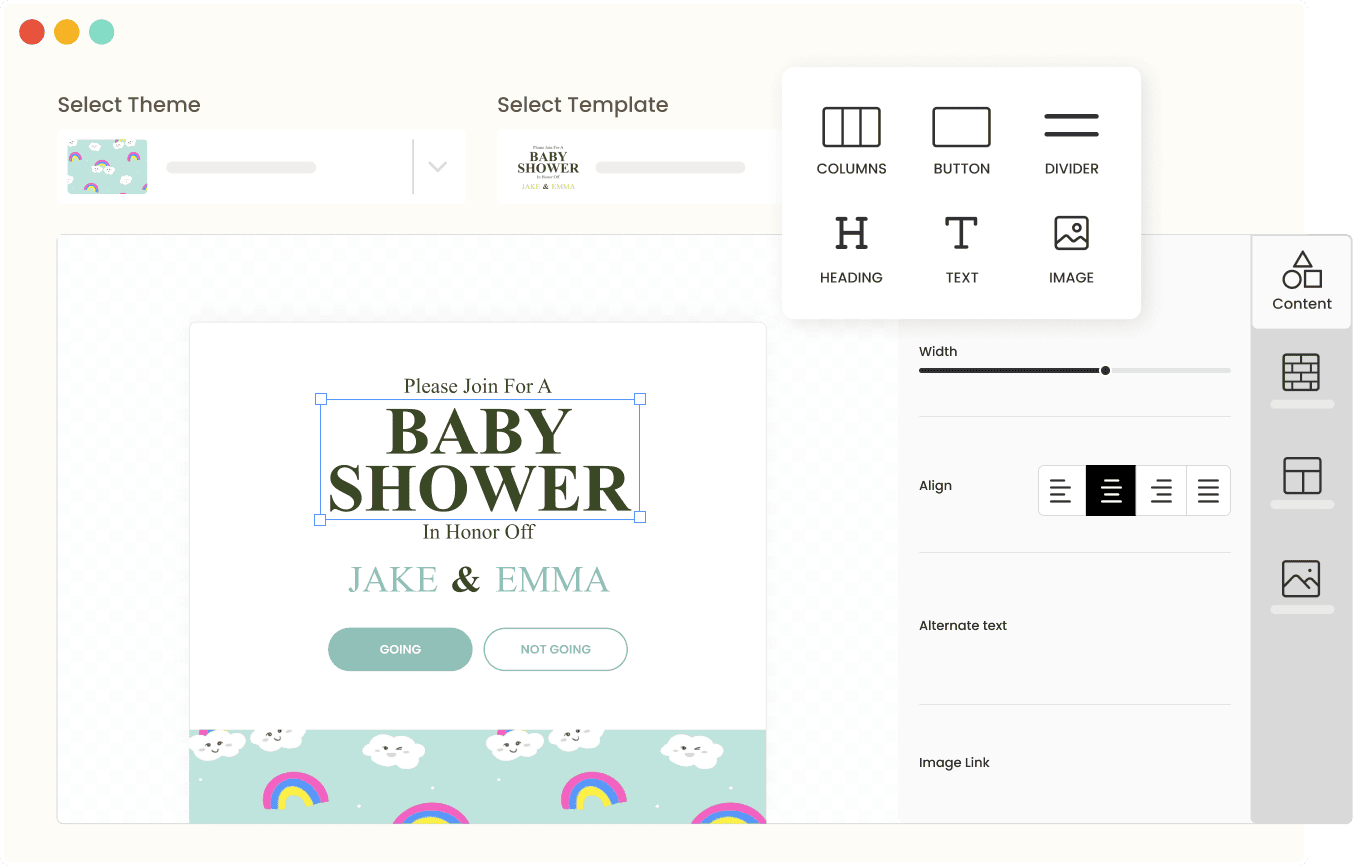
Your invitation should include the details guests need: the date, the time, the registry, and how to join. With WebBabyShower you can send matching digital invitations straight from your shower page, in designs that fit your theme, then track RSVPs and send reminders to anyone who hasn’t replied. Because the invitation links back to your page, guests land where the registry, the video call, and the shower details already live, and you can collect addresses and dietary information there too if you’re sending party boxes. If you’d rather make your own, tools like Evite, Paperless Post, or Canva can send an invite by email, though guests will then have to look elsewhere for the registry, RSVPs, and shower details.
Send Invitations Early
Try to send invitations four to six weeks before the shower. Then, send a reminder about a week before the event to make sure everyone has the link and knows how to join. Giving guests plenty of notice also gives them time to plan around the shower.
Step 3: Bringing the Party Together with a “Shower-in-a-Box”
What Is a Shower-in-a-Box?
A shower-in-a-box is a small package sent to guests before the shower, usually to close family and friends. Everyone can open their box during the call, giving guests something to share even though they’re celebrating from different places.
What to Include
You can include simple items like printed games, confetti for a reveal, party hats, or a candle. Having everyone light a candle at the beginning of the shower is an easy way to get everyone involved right away.
DIY or Pre-Made
If you’re short on time, Etsy has plenty of pre-made baby shower kits. You can also put together your own box with items from a craft store like Michaels. Ribbons, stickers, and small favors can add a personal touch without costing too much.
Shipping
Give yourself enough time for the packages to arrive. Try to have them delivered at least ten days before the shower, and use tracked shipping so you can keep an eye on the delivery.
Step 4: Setting Up the Registry

Connect Your Registry to Your Shower Page
WebBabyShower puts your registry right on your shower page, and you can connect the registries you already use, whether that’s Babylist, Amazon, Target, or a personal one. Babylist is handy if you want items from several different stores in one list, and Amazon is convenient for guests who already shop there. Whichever you choose, adding it to your page and your invitations means guests never have to hunt for the link, and co-hosts can pitch in to add items too.
Handling Larger Gifts
Since guests won’t be bringing gifts to a physical venue, it’s a good idea to have larger items shipped directly to the parents’ address. You can also include a note on the invitation letting guests know where to send larger gifts.
Other Gift Options
Not everyone wants to buy physical baby items. A diaper fund or gift cards for meal delivery are easy alternatives. You could also include a book registry for guests who would like to send a children’s book to the family.
Step 5: Planning the Itinerary
Keep It Short
Try to keep the shower to 90 minutes or less. Video calls can become tiring when they go on too long, so a fun 40-minute shower where everyone stays involved can be better than a slow 90-minute event.
Plan the Order of Events
Start with a few minutes for everyone to join the call, then move into a short welcome, an icebreaker, some games, gift opening, and a final toast. Keep transitions quick so guests always know what’s coming next.
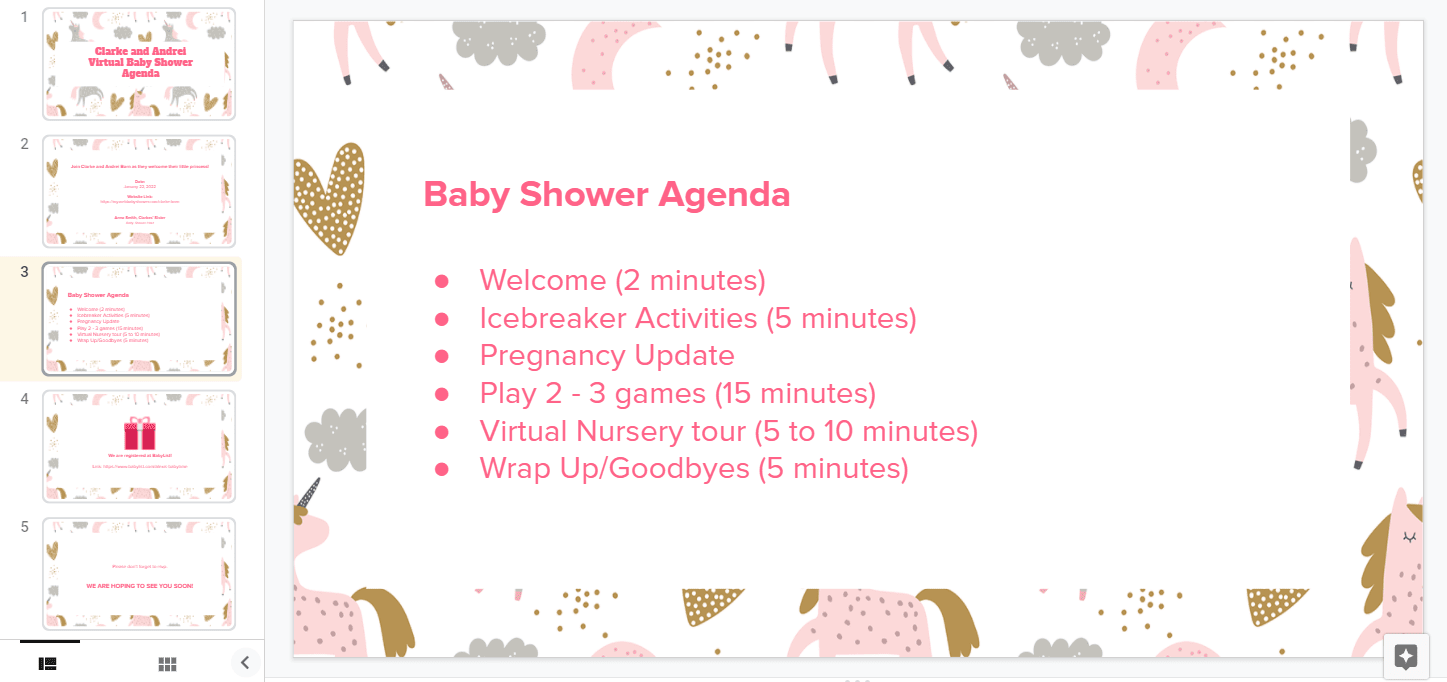
A simple 40-minute plan might look like this: 2 minutes to welcome everyone, 5 minutes for an icebreaker like sharing a favorite piece of parenting advice, a quick update from the parents-to-be, 15 minutes of games, 5 to 10 minutes for a nursery tour or gift opening, and a few minutes at the end to say thank you and goodbye.
Nursery Reveal and Gift Opening
If you’re opening gifts during the shower, have everything organized ahead of time. There are a few ways to handle it, depending on how much time you have.
The quickest is to open the gifts beforehand and show them off during the call while you thank each guest by name. For a nursery reveal, unwrap the gifts ahead of time, set them up in the nursery, and give guests a tour on the call. A pre-recorded video works well here, since it lets you show the room without a shaky camera or connection issues, and it works nicely when you have in-person guests too.
If you prefer, you can open gifts live, one at a time, with a few words for each person. It’s the most traditional approach, but it can drag on a video call, so it suits smaller groups. You can also skip the live opening completely and send thank-you notes afterward, taking a moment on the call to thank everyone as a group.

Step 6: Fun and Easy Baby Shower Games
Low-Effort Games
Keep games simple so everyone can join without needing a lot of supplies, and pick from dozens of virtual baby shower games. For example, try Emoji Pictionary, where guests guess children’s book titles from emojis on the screen. Nursery rhyme trivia is another easy option that works well through the chat.
At-Home Scavenger Hunt
For something more active, try an at-home scavenger hunt. Call out items like something blue, a pacifier, or a baby photo, and give guests 30 seconds to find them and hold them up to the camera. It can get a little chaotic, but that’s what makes it fun.
Match the Games to Your Guests
Pick games that suit who is on the call. Close friends might enjoy something cheeky, while grandparents and coworkers usually prefer classics like baby bingo or trivia. If you have a co-ed group, add a game that gets the partners involved too. WebBabyShower has built-in games with a scoreboard, so you can keep score and hand out prizes, and there are printable versions for any guests joining in person.

Step 7: Setting the Scene with Digital Decor
Virtual Backgrounds
A virtual background with pastel colors, balloons, and baby-themed decorations can help set the mood. You can also add virtual confetti or other fun effects during the reveal.
Coordinated Outfits
Ask guests to wear the same color, such as blue, or choose a fun theme like Minnie Mouse ears. It’s a simple way to make the group feel more connected without asking guests to spend much money.
Step 8: The Host’s “Command Center” (Tech Troubleshooting)
Appointing a Tech Co-Host for Guests Who Need a Little Help
Having one guest act as a tech co-host gives Grandma and Grandpa, or anyone else who needs a little help, someone to turn to if the microphone isn’t working or they can’t find the video button. It’s a small role, but it can keep tech issues from taking time away from the actual celebration.
Recording the Celebration: Tips for a Keepsake Video
If you want a video to look back on later, ask a tech-savvy guest to help set up the cameras and make sure everyone is included in the recording. This is especially helpful for guests who aren’t used to video calls. Having someone else handle the tech means the parents-to-be can relax and enjoy the shower instead of worrying about who’s connected or whether the camera is working.

Step 9: Post-Shower Follow-Up
Saying Thank You Afterward
A social media post, email, or short personal video can all be great ways to thank your guests. You don’t need to make it complicated. A simple message letting everyone know you appreciated them can go a long way.
Sharing the Memories: Photo and Video Galleries for Guests
Putting together a photo and video gallery after the shower gives everyone a chance to look back on the celebration and see moments they may have missed. It’s also a nice way to keep the celebration going and give hosts and guests something to revisit after the shower is over.
Conclusion
Planning a virtual baby shower doesn’t have to be complicated. Choose a platform your guests are comfortable using, or use WebBabyShower to keep your shower details and guests organized in one place. Send party boxes with enough time for them to arrive, make the registry easy to access, and plan a simple itinerary that keeps everyone involved. With a little preparation, you can create a fun celebration where family and friends can share in the excitement, no matter where they are. When you are ready, browse the themes and start a free demo.